Social Media Food Photography: Specs and Strategies That Work
74% of people use social media to decide where to eat. Here's how to get your food photography right for Instagram, TikTok, Facebook, and Pinterest - dimensions, formats, and what actually drives engagement.
In This Article
- All Platforms at a Glance
- Why Social Media Photography Matters
- Instagram Specifications
- TikTok Specifications
- Facebook Specifications
- Pinterest Specifications
- What Actually Drives Engagement
- FAQ
All Platforms at a Glance
The safest food photo sizes in 2026: Instagram feed 1080 x 1350 px (4:5), Stories/Reels and TikTok 1080 x 1920 px (9:16), Facebook feed 1080 x 1350 px (4:5), Pinterest 1000 x 1500 px (2:3). Shoot vertical at high resolution and crop down for each platform.
| Platform | Primary Format | Dimensions | Aspect Ratio |
|---|---|---|---|
| Instagram feed | Portrait | 1080 x 1350 px | 4:5 |
| Instagram Stories/Reels | Vertical | 1080 x 1920 px | 9:16 |
| TikTok | Vertical video | 1080 x 1920 px | 9:16 |
| Facebook feed | Portrait | 1080 x 1350 px | 4:5 |
| Standard pin | 1000 x 1500 px | 2:3 |
Delivery platforms need different formats entirely - landscape ratios like 5:4 for Uber Eats and 16:9 for DoorDash. Details for each social platform below.
Why Social Media Photography Matters
The numbers tell the story:
- 74% of people use social media to decide where to eat[1]
- 72% research restaurants on social media before visiting[1]
- 40% try a new restaurant after seeing food photos online[1]
- 60% of restaurants using Instagram see a spike in reservations[1]
For Gen Z specifically, 84% actively try social media food trends, and 70% identify TikTok as their most valuable platform for food recommendations.[2] With Gen Z representing 40% of global consumers by 2025, ignoring social media means ignoring a significant portion of your potential customers.[3]
Unlike delivery platforms where you're competing in a structured marketplace, social media lets you build a direct relationship with customers. Good food photography here doesn't just drive orders - it builds the brand recognition that brings people back.
Instagram Specifications
For Instagram food photos, use 1080 x 1350 px (4:5 portrait) in the feed and 1080 x 1920 px (9:16) for Stories and Reels. Portrait takes up the most screen space and consistently outperforms square for food content.
Instagram remains the primary platform for restaurant marketing, with 90% of restaurants rating it as very or extremely important.[1]
Feed Posts
| Format | Aspect Ratio | Dimensions | Best For |
|---|---|---|---|
| Square | 1:1 | 1080 x 1080 px | Classic food shots, overhead angles |
| Portrait | 4:5 | 1080 x 1350 px | Tall dishes, plated presentations |
| Landscape | 1.91:1 | 1080 x 566 px | Table spreads, wide compositions |
The 4:5 portrait format is generally most effective for food - it takes up more screen real estate than square and keeps attention on the dish.[4]
Stories and Reels
| Format | Aspect Ratio | Dimensions |
|---|---|---|
| Stories | 9:16 | 1080 x 1920 px |
| Reels | 9:16 | 1080 x 1920 px |
Full-screen vertical content dominates engagement on Instagram now. Reels in particular get priority in the algorithm - short video content showing food preparation or plating can reach audiences far beyond your follower count.[4]
Technical Details
- File formats: PNG, JPG, BMP, non-animated GIF
- Video formats: MOV, MP4 (up to 60 seconds in-app)
- Maximum width: 1080px (larger images are downscaled)
- Safe zone: Keep critical elements 250-310 pixels from top and bottom edges for Stories/Reels
TikTok Specifications
TikTok food content should be vertical 1080 x 1920 px (9:16) video, ideally 9-15 seconds long at 30 or 60fps. Image carousels work too, at a minimum of 720 x 1280 px.
TikTok has become essential for reaching younger diners. 29% of people have picked a restaurant solely because it looked good on TikTok.[1]
Video Dimensions
| Format | Aspect Ratio | Dimensions | Notes |
|---|---|---|---|
| Vertical (recommended) | 9:16 | 1080 x 1920 px | Full-screen, highest engagement |
| Horizontal | 16:9 | 1920 x 1080 px | Lower engagement but works for some content |
| Square | 1:1 | 1080 x 1080 px | Repurposed Instagram content |
Vertical (9:16) is strongly preferred. TikTok's interface is designed for vertical scrolling - horizontal content feels out of place and typically performs worse.[5]
Technical Requirements
- File formats: MP4, MOV, MPEG, 3GP, AVI
- File size limits: iOS up to 287.6 MB, Android up to 72 MB, Desktop up to 500 MB
- Video length: Up to 10 minutes (shorter performs better)
- Frame rate: 30fps or 60fps recommended
- Optimal duration: 9-15 seconds for highest engagement
Image Posts (Carousel)
TikTok supports image carousels:
- Vertical: 720 x 1280 px minimum (9:16)
- Square: 640 x 640 px minimum (1:1)
- File types: JPG, JPEG, PNG
- Max file size: 100 MB
Facebook Specifications
Facebook remains relevant for restaurant marketing, particularly for reaching older demographics and managing community engagement.
Feed Posts
| Format | Aspect Ratio | Dimensions | Notes |
|---|---|---|---|
| Square | 1:1 | 1080 x 1080 px | Consistent with Instagram |
| Portrait | 4:5 | 1080 x 1350 px | Maximum feed real estate |
| Landscape | 1.91:1 | 1200 x 630 px | Link preview default |
Page Cover Photo
| Type | Dimensions | Notes |
|---|---|---|
| Desktop display | 820 x 312 px | What users see on desktop |
| Mobile display | 640 x 360 px | What users see on mobile |
| Recommended upload | 1200 x 674 px | Best quality across devices |
Cover photos display differently on desktop versus mobile. Design with the center area as your safe zone - edges get cropped on mobile.[6]
Technical Details
- Profile photo: Upload 400 x 400 px (displays at 170 x 170 px)
- Stories: 1080 x 1920 px (9:16)
- Preferred format: sRGB JPG under 100 KB for fastest loading
Pinterest Specifications
Pinterest drives significant traffic for restaurants, particularly for special occasions, event catering, and aspirational dining. Users come to Pinterest specifically looking for food ideas.
Pin Dimensions
| Pin Type | Aspect Ratio | Dimensions | Best For |
|---|---|---|---|
| Standard | 2:3 | 1000 x 1500 px | Most food content |
| Idea Pin | 9:16 | 1080 x 1920 px | Recipe tutorials, step-by-step |
| Video Pin | 9:16 | 1080 x 1920 px | Cooking process, plating |
| Long/Infographic | 1:2 to 1:3 | 1000 x 2100 - 3000 px | Recipe cards |
The 2:3 vertical format is Pinterest's bread and butter. Vertical pins take up more space in the feed and perform significantly better than square or horizontal.[7]
Technical Requirements
- File formats: PNG (for text-heavy images), JPG (for photos)
- Max file size: 20 MB (desktop), 32 MB (in-app)
- Pin title: Up to 100 characters (first 40 most visible)
- Video length: 6-15 seconds optimal for engagement
Pinterest-Specific Tips
- Warm, natural colors (reds, oranges, yellows) perform best for food[7]
- Keep text overlay to maximum 10 words
- Portrait orientation strongly preferred over landscape
- Recipe content consistently outperforms single-dish photos
What Actually Drives Engagement
Specifications get your content displayed correctly. Strategy gets it shared. High-quality photos influence 57% of customer decisions, behind-the-scenes content lifts engagement 19%, and consistency beats virality for bringing diners back.
Here's what that looks like in practice - the same source photo, prepared for a delivery listing versus a social feed:
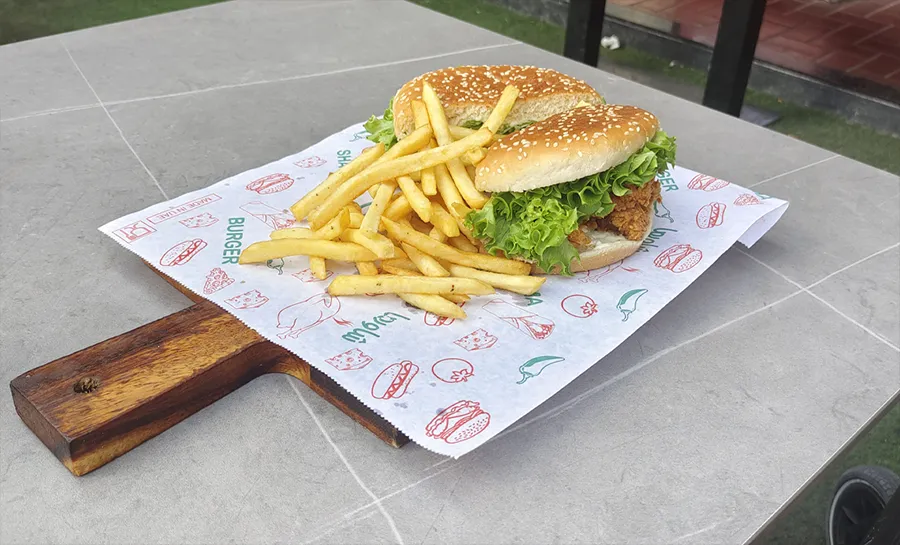 Before
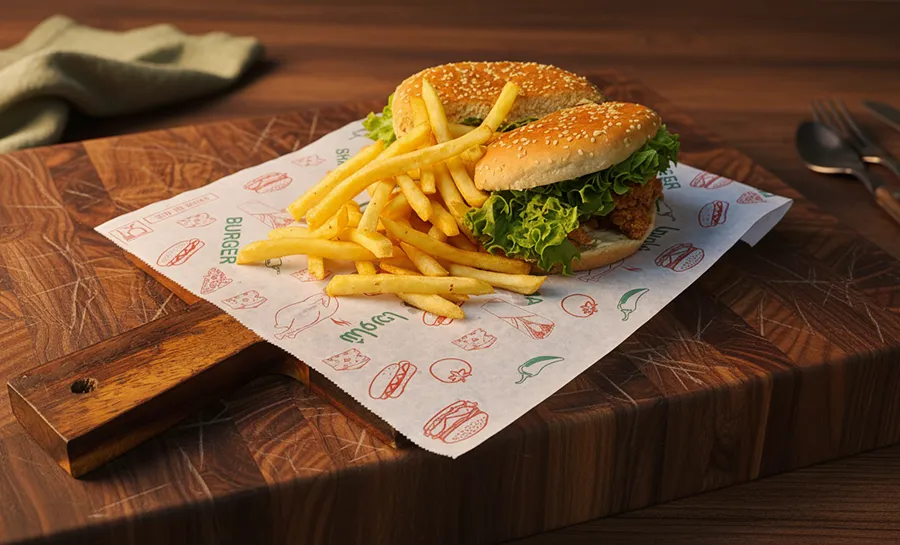 After
AfterContent Types That Work
| Content Type | Effectiveness | Notes |
|---|---|---|
| High-quality food photos | 57% influenced by photos[8] | Foundation of restaurant social media |
| Behind-the-scenes | 19% engagement boost[1] | Kitchen prep, staff stories |
| Video (dining experience) | 38% prefer video[8] | Plating, cooking process |
| Promotions/deals | 44% interest[1] | Time-limited offers |
Posting Frequency
| Platform | Recommended | Notes |
|---|---|---|
| 2-3 posts/week | Quality over quantity | |
| TikTok | 3-5 videos/week | Short-form content, consistency matters |
| 1-2 posts/day max | Avoid oversaturation | |
| 5-10 pins/day | Can include repins |
Optimal Posting Times (Food/Restaurant Content)
| Platform | Best Days | Best Times |
|---|---|---|
| Monday, Thursday, Friday | 11 AM - 1 PM | |
| TikTok | Friday | 12 PM - 5 PM |
| Tuesday, Friday | 9 AM - 11 AM |
These are general guidelines based on when food content performs best.[9] Your specific audience may differ - check your analytics.
The Consistency Factor
22% of diners return to a restaurant because of its social media presence.[1] This isn't about viral moments - it's about consistent, quality content that keeps your restaurant top of mind.
Restaurants that post consistently with professional-looking images build recognition. When someone thinks "where should we eat tonight," you want your food to be what they picture.
Using GourmetPix for Social Media
Social media requires more variety than delivery platforms. You're not just showing what's on the menu - you're building a brand aesthetic.
Aspect Ratio Coverage
GourmetPix supports the key social media ratios:
- 1:1 (Square) for Instagram feed, Facebook
- 4:5 (Portrait) for Instagram feed (maximum engagement)
- 9:16 (Stories) for Instagram Stories, Reels, TikTok, Pinterest Idea Pins
- 16:9 (Widescreen) for YouTube thumbnails, Facebook video
Style Variety
Social media rewards variety. The same dish can work in multiple posts:
- Studio style for clean, product-focused shots
- Cozy/Rustic for lifestyle, homestyle content
- Outdoor for fresh, seasonal messaging
- Custom using your restaurant interior for branded content
A single photo session can generate weeks of varied content by processing the same source images through different styles.
Creative Refinement
The refinement step is where social media content really comes alive. Add decoration, props, and styling elements that would take hours to set up in a real photoshoot. Want scattered herbs around your pasta? A drizzle of sauce on the plate? Seasonal decorations for a holiday post? Describe what you want, and GourmetPix adds it to your image. This creative flexibility is what separates scroll-stopping social content from basic menu shots.
Building a Content Library
For restaurants posting 2-3 times per week, you need a steady flow of images. With GourmetPix, one source photo can become multiple pieces of content - process the same dish in different styles, aspect ratios, and with different decoration for variety. Update your library whenever you add new dishes or want seasonal variations, without scheduling another photoshoot.
Cross-Platform Strategy
Shoot Once, Use Everywhere
If you're creating content for multiple platforms, shoot at the highest common denominator:
- Shoot at 1080 x 1920 (9:16) - the vertical format for Stories/Reels/TikTok
- Crop to 1080 x 1350 (4:5) for Instagram feed
- Crop to 1080 x 1080 (1:1) for Facebook/basic Instagram
- Crop to 1000 x 1500 (2:3) for Pinterest
This approach assumes vertical is your primary format. If you're focused on Pinterest, start with 2:3 and crop for other platforms.
Platform-Specific Adjustments
| Platform | Optimization Focus |
|---|---|
| Visual polish, cohesive feed aesthetic | |
| TikTok | Motion, trending sounds, authenticity |
| Community engagement, event promotion | |
| Searchability, descriptive text, vertical format |
Ready to build your social media content library? Try GourmetPix free with 10 credits - no credit card required.
Frequently Asked Questions
What size should Instagram food photos be?
For Instagram feed posts, use 1080 x 1350 pixels (4:5 portrait) for maximum screen real estate, or 1080 x 1080 pixels (1:1 square) for classic food shots. Stories and Reels should be 1080 x 1920 pixels (9:16 vertical).
What's the best image size for TikTok?
Vertical 1080 x 1920 pixels (9:16) is strongly recommended for TikTok. The platform is designed for vertical scrolling, and horizontal content typically performs worse.
How often should restaurants post on social media?
Instagram: 2-3 quality posts per week. TikTok: 3-5 videos per week (short-form content benefits from frequency). Facebook: 1-2 posts per day maximum. Pinterest: 5-10 pins per day including repins.
Do food photos actually drive restaurant traffic?
Yes. 74% of people use social media to decide where to eat, 40% try new restaurants after seeing food photos online, and 60% of restaurants using Instagram report increased reservations.
What type of food content performs best on social media?
High-quality food photos drive 57% of customer decisions. Behind-the-scenes content (kitchen prep, plating) generates 19% higher engagement. Video content showing the dining experience is preferred by 38% of users. Promotions and deals interest 44% of followers.
Should I use the same photos for delivery apps and social media?
They work best with different treatments. Delivery apps favor clean, product-focused shots with neutral backgrounds - busy styling gets rejected as "distracting." Social media rewards the opposite: lifestyle context, props, and creative styling drive engagement. The aspect ratios also differ (landscape for apps, vertical for social). With GourmetPix, process the same source photo in "Studio" style for delivery apps, then use the refinement step to add decoration, props, and custom styling for social media.
References
Ready to Transform Your Food Photos?
Join thousands of restaurants and food businesses using AI to create stunning, professional images.
GET STARTED